Oracle Fusion Cloud CX Sales: identify callers in Webex
CRM · all sectors · international
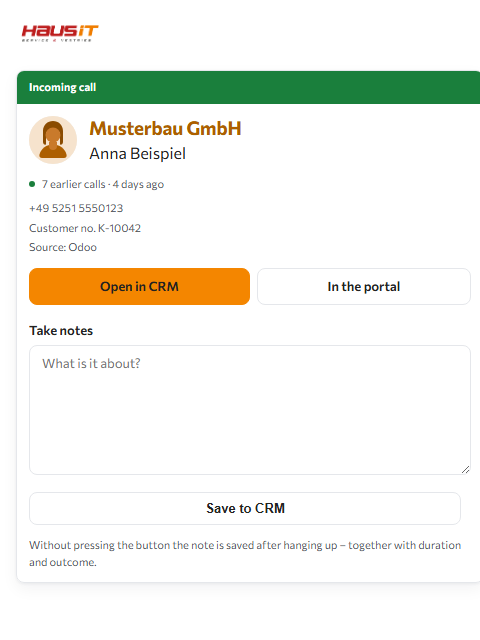
If someone calls whose number is in Oracle Fusion Cloud CX Sales, the Webex sidebar gives their name – before you pick up. The lookup happens in your own Oracle Fusion Cloud CX Sales, at the moment of the call. With Oracle Fusion Cloud CX Sales, the company is added. One click opens the record in Oracle Fusion Cloud CX Sales.
- The phone rings Incoming call
- Webex reports the number
- Haus iT Caller ID standardises it
- Your Oracle Fusion Cloud CX Sales looks it up Your customer data stays here
- The sidebar names the caller
What the Oracle Fusion Cloud CX Sales connector delivers
- Finds by phone number – yes When the phone rings, the caller's number is looked up in this system. That is the basic service; without it there would be no connector.
- Finds by name – yes You can also type a name into the Webex tile's search bar. Without this capability the connector only answers the question “who is calling”.
- States the company – yes The company the caller works for is added to their name – provided it is maintained in the system.
- States the customer number – no The system does not supply a customer number through this interface. The line stays empty – it is not guessed.
- Links into the record – yes A click in the tile opens the record in the system itself – no searching, no signing in.
- Writes the call note back – yes After hanging up, a field appears in the Webex tile. What you write there, the portal files as a note on the contact – but only if your company switches this on deliberately. Without that tick, it only reads.
These details are not maintained by hand; they are read from the same description the query itself runs on. They therefore cannot go stale without the connector changing with them.
How the query works
When the phone rings, Webex reports the number to the portal. The portal queries your Oracle Fusion Cloud CX Sales with it – using the credentials your company has stored for that purpose – and returns what it found. There is no nightly sync and no copy of your customer base with us.
The result is cached so the same number is not queried on every call: hits for 14 days, unsuccessful queries for 24 hours.
What you need in Oracle Fusion Cloud CX Sales
- Address of your Oracle environment
- User name
- Password secret
The portal walks you through where to find these details in your system step by step during setup.
The connector is set up once for the entire company. Which employee may use the Webex tile is decided by management or IT in the portal – the tile is billed per user, so set up is not the same as enabled.
Limits of this connector
- Oracle Fusion Cloud CX Sales does not provide a customer number over this interface. The line then stays empty – it is not guessed.
- A contact system knows customers – not suppliers, not public authorities, not tradespeople. For everything that will never be in there, the portal has its own number book.
When you place the call
You type a name into the tile's search bar – Oracle Fusion Cloud CX Sales returns the phone numbers stored there, and one click has Webex dial.
- The search bar type a name
- Your Oracle Fusion Cloud CX Sales returns the numbers Your customer data stays here
- The tile shows each one
- Webex dials on one click
Every stored number appears on its own, with its label – office, mobile, private. Otherwise someone who called from a mobile gets a callback to the desk they are not sitting at.
Dialling is done by the Webex client. The portal opens no connection – it hands the number to your operating system, which passes it on to Webex.
Dialling out of Oracle Fusion Cloud CX Sales – clicking a phone number in the system itself – is not possible; nothing is installed on the workstations. If you want to work through a list, turn the direction around: the power dialler pulls it out of Oracle Fusion Cloud CX Sales into the tile, and dialling happens there. Back into Oracle Fusion Cloud CX Sales the connector writes the call note after hanging up and an unknown caller as a new contact – but only if you switch that on yourself. Without that tick it reads and nothing else.
What it looks like
Questions about Oracle Fusion Cloud CX Sales and Webex
How do I see who is calling in Oracle Fusion Cloud CX Sales?
You do not see it in Oracle Fusion Cloud CX Sales but in Webex: Haus iT Caller ID looks the number up in your Oracle Fusion Cloud CX Sales while the phone rings and shows the result in the sidebar of the Webex client – before you pick up.
What appears in the tile then?
Always the caller's name. Plus the company, provided it is filled in on the record. A button opens the record in the system.
What does the Oracle Fusion Cloud CX Sales connector need?
These details: Address of your Oracle environment, User name, Password. The portal shows you where to find them in Oracle Fusion Cloud CX Sales during setup.
Is my customer data copied?
No. The question goes straight to your Oracle Fusion Cloud CX Sales, at the moment of the call. No copy of your customer base is created here, and no call content is processed.
What happens if the caller is not in Oracle Fusion Cloud CX Sales?
Then they stay unknown for now – a contact system knows customers, not suppliers or public authorities. That is what the portal's own number book is for: once someone is named, they are identified from then on.
What does it cost?
The portal with connection to Webex, retention of call data and number book is free, with no limit on workplaces. The Webex tile is billed per user per month.