


Home › For CRM and ERP vendors
Your software on the phone
When the phone rings, your system knows who is calling — nobody asks it. We ask it. You do not need to understand a phone system for that; you need to open up an interface.
This page is written for makers of CRM and ERP systems. It describes what the Haus iT portal does, which systems are connected today, and what format we need for an integration.
What your customers get out of it
The gain does not arise at your end or at ours, but at the desk where the phone rings. Nobody has measured how much time is spent searching there in your industry — so we claim no number of minutes. What we have measured is further down under Where the figures come from .
The call starts with an answer
Instead of “Who am I speaking to?” and “Do you have a customer number?”, the name is already there. At twenty calls a day that is half an hour not spent searching.
One click instead of a search
The link opens the record in your system — where everything already is. Nobody retypes a number into a second window.
Calling straight from the record
A link on the number is enough and the Webex client dials. No typos, no wrong extension.
Management sees what is left undone
Not how much was on the phone, but with how many customers — and which of them nobody has reached for weeks. That is the report sales actually asks for.
Missed calls are a list
With number, place and waiting time — to work through, not just to count. Whoever tried three times this morning is at the top.
Nothing to install
No software on the workstations, no server on site. The tile runs inside the Webex client your customers already have open.
And what you get out of it as a vendor
A telephony integration is a feature asked for in every tender and built by hardly any mid-sized software house itself — because the effort has nothing to do with their own field. That is exactly the part we take on.
Telephony in your offering, without telephony in your company
No Cisco contract, no certification, no call detail records, no number normalisation. All of that is built and running in production.
Your system gets opened more often
Every recognised caller carries a link into the customer record. The click goes to you, not to us — and every call becomes a reason to use your software.
One endpoint, not a project
What we need fits on half a page. In our experience one to two days of developer time — once, for all your customers.
An argument in the tender
“With our software the employee sees who is calling.” Otherwise only the big players say that — and tender writers increasingly take it for granted.
No support for someone else’s technology
If the phone does not ring, that is our call to take, not yours. We are the telephony provider and stay that way — you stay in the field you know.
A report on your data — free of charge
On the first run we see how many records can be resolved by phone and what else is in the way: e-mail addresses in the phone field, local numbers without an area code. We report that back — it helps every one of your customers, not just the integration.
One key per customer, entered by the customer: you keep control over who sees what and can withdraw an account at any time without us having to do anything.
What the user sees
Two things, and both are in use: the tile in the Webex client and the sales reporting in the portal.
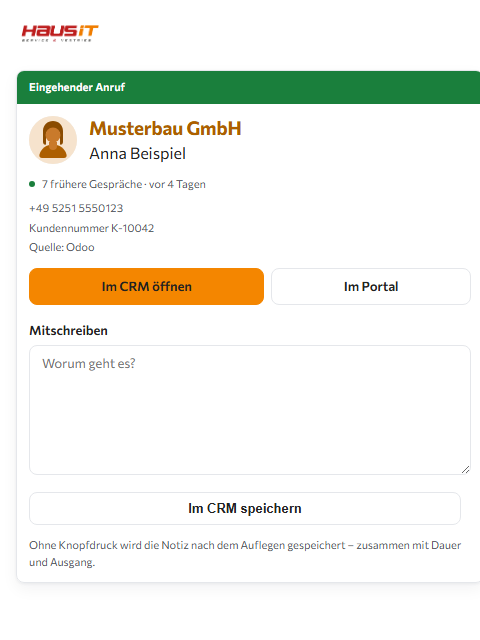
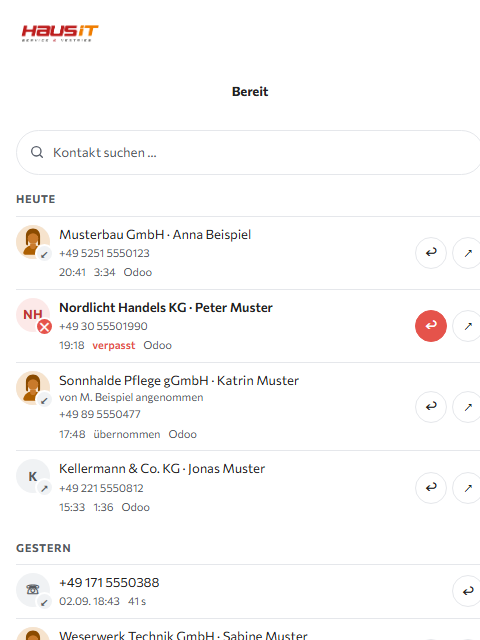
Haus iT Caller ID
Runs in the sidebar of the Webex client. Reviewed by Cisco and listed in the App Hub.
- Who is calling — and through which queue
- Who in the company took the call
- Search bar and dial pad for outgoing calls
- One click opens the customer in your system
Sales controlling
Answers not how much was on the phone, but with how many customers .
- Customers reached and touched, reach rate
- Customers nobody has called for weeks
- Queues, response time, repeat callers
- Daily pattern per employee, as a table to take away
Both are only as good as the match between number and customer — and that comes from your system.
What is connected today
These systems are fully connected and answer at the moment of the call . They are listed here because they run — not because they are planned.
 ActiveCampaign
 Axonaut
 bexio
bexio
 Billage
 Bitrix24
 Capsule CRM
 Copper
 EspoCRM
 ForceManager (Sage Sales Management)
 Holded
 HubSpot
 JTL-Wawi
 Kommo
Kommo
 Magicline
 Microsoft 365 (Outlook)
 Mobilia
 MOCO
MOCO
 monday.com
 Odoo
Odoo
 onOffice enterprise
 orgaMAX Buchhaltung
 Pipedrive
 Pipeliner CRM
 plentymarkets (PlentyONE)
 Propstack
 Salesforce Sales Cloud
 SAP Business One
 SAP Cloud for Customer
 SAP S/4HANA
 SAP Sales Cloud und Service Cloud V2
 Sellsy
 Shopify
 Shopware 6
 SuperOffice CRM
 SuperOffice CRM On-Site
 TANSS
TANSS
 Teamleader Focus
 televero
 Vtiger CRM
 weclapp
 Xentral
 Zendesk Sell
 Zendesk Support
 Zoho CRM
 zvoove Recruit
58 of 64 systems in the catalogue answer at the moment of the call. The other 5 hand over their customer base only in bulk; for them the portal runs a nightly sync, and the answer is only as fresh as the last run — which is why they are not offered to customers.
Shown here are the systems for which we have a logo – the wall of logos is not a complete list.
The names and logos belong to their respective owners. They appear here as a statement of compatibility; no partnership or endorsement is claimed.
What the connector can do
What appears in the user's tile is decided by your interface. So what stands here is not what we could do, but what the 64 systems in the catalogue actually answer today – counted at the moment you loaded this page.
| What the user sees | Systems | What it is for |
|---|---|---|
| Search by phone number | 59 of 64 | The one mandatory function. A number in, the record out – in under a second, while the phone is ringing. |
| Search by name | 56 of 64 | For the search bar in the tile: partial word across person and company name, in a single call. |
| Company of the caller | 36 of 64 | So that it is not just a name standing there, but the company the caller is calling for. |
| Customer no. | 26 of 64 | The number the user works with every day – and the one they otherwise search for. |
| Link that opens the record | 18 of 64 | One click from the tile into your system, without a second window and without searching. The smallest figure on this page – and the point where a connector stands out most clearly. |
| Creating an unknown caller as a contact | 22 of 64 | If someone calls who does not exist yet, the portal creates them in your system after the conversation – only if the user switches that on explicitly. |
| Writing the call note back | 27 of 64 | What is noted after hanging up appears on the contact or the case in your system, not in a second tool. |
What your system does not hand out stays empty in the tile. Nothing is guessed – a wrong customer number is worse than none. Which fields a connector carries is public in the wiki for each system.
What comes on top, independently of your system
You neither build nor maintain what follows. It runs in production and applies to every connector alike – to yours as well.
Phone numbers that find each other
The same number arrives in five spellings. The portal standardises it and resolves dialling codes at home and abroad – the longest matching one wins. Your interface receives a clean number.
Several sources in one answer
If your system does not find the caller, the portal asks further – the user's address book, their own number directory. The user sees one line, not three empty windows.
Working the call queue
Which call queue the call came through, who took it – and signing in and out straight from the tile, without opening a second program.
Working through missed calls
With number, place and waiting time, as a list instead of a figure. The call back goes out from the same tile, and whoever has been reached disappears from it.
Call lists with a brake
A list comes from a filter in your system or from a spreadsheet – and only after a preview showing the count. A block list, calling hours and an attempt limit per company apply to the automation just as they do to the button.
Asking for fields at runtime
If your system can report on its own fields, we ask it instead of assuming. Then a connector survives your next release and your customers' own adjustments.
Your customers abroad
The interface, the tile and the public pages are available in 24 languages. A customer of yours outside the German market gets the same connector in their own language – without you or us rebuilding anything for it.
Nothing on the workstations
No installation, no server at the user's site, no device drivers. The tile runs in the Webex client your customers already have open.
What we can connect
Practically any system that is reachable over HTTP and returns JSON. The catalogue knows 7 authentication methods, and not one has yet come along that did not fit:
Sign in
Authorization: Bearer …-
A header of your own, such as
X-Api-Key -
Key in the URL (
?token=…) - Basic auth, including the key as the user name
- OAuth 2 — client credentials, with refresh
- Digest, for systems that still require it
- Signature per request (HMAC)
Response shapes
- A list of records, nested to any depth
- An object keyed by the identifier
- A single record
- Paged or all at once
Protocols of your own
JSON-RPC, OData and Microsoft Graph are implemented as connectors of their own. A special case is no reason to exclude anyone — it is just more work on our side, not on yours.
What format we need
For us an integration is a description file, not a program . That is why it is ready in a day. This is what it looks like — shortened, but real:
'basis'  => 'https://{instanz}/api',

'auth'   => ['art' => 'bearer', 'feld' => 'api_key'],

'suche'  => ['pfad' => '/kunden/suche?telefon={nummer}',
             'liste' => 'data'],

'abbildung' => [
    'name'         => ['{vorname} {nachname}', 'firma'],
    'firma'        => 'firma',
    'kundennummer' => 'kundennr',
    'kennung'      => 'id',
    'telefone'     => ['telefon', 'mobil', 'zentrale'],
    'url'          => 'https://{instanz}/kunde/{id}',
],
For that to work we need from you exactly what is in this file: the address, the authentication method, the search path and the names of your fields. An anonymised sample response is enough for that — we do not need real customer data to build an integration.
The two endpoints we are asking for
1 · Search by phone number
GET /api/kunden/suche?telefon=%2B4952512020505
What matters is not the path but the comparison . Reduce both sides to digits only and compare over the last nine digits — then “05251/2020505”, “+49 5251 2020505” and “+49 (0)5251 2020505” are the same number. This is exactly where most integrations fail. Search every phone field, not just the first: most calls come from a mobile.
2 · Search by name
GET /api/kunden/suche?name=Beispiel
For the search bar in the tile — so nobody has to open your system in a second window just to find a number. Ten results are enough.
Also helpful: the URL pattern of a customer record (so the click from the tile leads into your system), whether your list pages beyond a certain size, and how often we may query. We guess nothing: a link that points nowhere is worse than none.
Where the figures come from
We quote no figure we have not measured ourselves, and we say how and when. What is missing here is missing on purpose — an estimated percentage is convenient in sales and embarrassing in the first technical conversation.
| Figure | How it was measured | What it is not |
|---|---|---|
|
3,579 records in 2.1 seconds |
A single query against the production instance of an automotive trade system on 1 September 2026, from our data centre, storing nothing. | Not a load test. With ten times as many records it may look different — the interface will probably page then. |
|
80.7 % resolvable resolvable |
From the same 3,579 records: 2,888 carry at least one phone number that can be normalised into a valid number. Counted per customer, not per number. | Not an industry figure. A value from real data – another data set lies higher or lower. |
| 64 systems, 58 with a direct query | Counted from this portal's catalogue, at the moment you loaded this page. Of the 64 systems, 58 answer at the moment of the call: 53 through a description file, 5 through a connector of their own in the source code – DATEV, Microsoft 365 (Outlook), Odoo, SAP Cloud for Customer and zvoove Recruit do not speak REST but a language of their own. 5 more deliver their customer base only in one piece and are therefore not offered to customers. | Not a ranking. The catalogue says which system can answer a phone number – which one is right for your case is settled by the test access. |
|
1–2 days of developer time |
An empirical value from the integrations built so far, for two search endpoints on an existing data model. | Not a commitment. Anyone who has to normalise their numbers first will need longer — we say that beforehand, not afterwards. |
We measure with tools that belong to the portal and that we will show you in conversation: the structure of a response can be evaluated without keeping its values, and a connector can be played through without storing a single row. We dislike working with figures whose origin nobody remembers.
Three questions that come up at this point
“What does this cost us?”
On your side, the developer time for two endpoints. We build the connector from them; for that we charge a one-off handling fee of €899.00 plus VAT – payable only once the interface works. There is no licence fee, no minimum volume and no exclusivity agreement. Ongoing billing happens with the user who books the tile or the sales monitoring.
“And if we change our minds?”
Your endpoints are yours. A customer who withdraws the key ends the integration immediately — without anyone here having to do anything. No lock-in arises at any point.
“What happens to our customers’ data?”
With a direct query the data stays entirely with you. We ask about a number and display the answer — none of it is stored. Only if your system offers no search do we need an export, and even then only five fields.
How it goes
- A conversation between the developers. One hour is enough. We show what the portal makes of your fields.
- A test account. One key for one instance. We check your response and report back what we see — including what strikes us about your data.
- Your endpoint. Search by number and by name. One to two days; the specification is ready before you start.
- Live. Your system is in the catalogue. Any of your customers can select it and enter their own key.
What happens to the data
No call content is processed. The number is used solely to look up in the user’s system. With a direct query your data stays entirely with you — we keep no copy. In the nightly sync we store per customer what the single question “who is calling” requires: number, name, company, customer number, link. No addresses, no revenue, no notes.
Every user enters their own key. It is stored encrypted and cannot be read back afterwards, not even by the person who entered it. To the privacy policy
Let us talk about it
A meeting with your developer and ours. One hour is enough — afterwards both sides know whether it fits.
Book a meeting directly Download the presentation
Wolfgang-Udo Mertens
Managing Director · Haus iT Service & Vertrieb
a division of Mentor GmbH, Paderborn
+49 5251 20208-11 ·
wumertens@mentor-group.de
Mentor GmbH · Am Hoppenhof 30a · 33104 Paderborn · Handelsregister HRB 9975, Amtsgericht Paderborn · Geschäftsführer: Wolfgang-Udo Mertens